


App Success: Why Most Mobile Apps Fail Before They're Downloaded
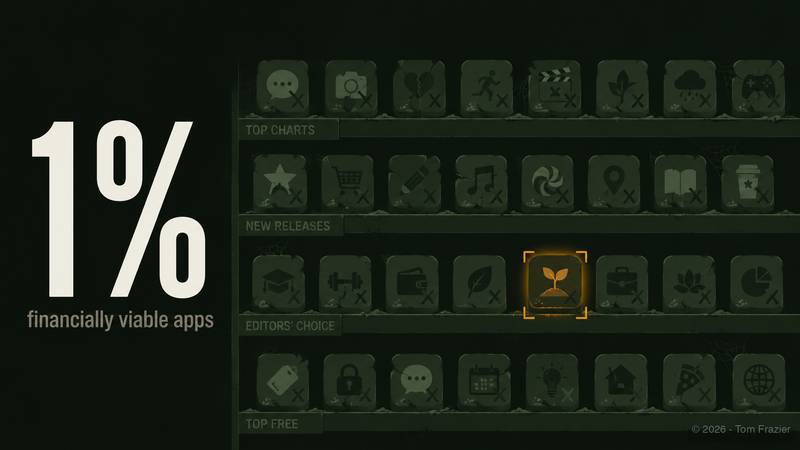
Fewer than 1 percent of consumer apps become financially viable businesses. This is not a marketing problem or a discovery problem. It is a strategic problem and it almost always originates in decisions made before the first line of code is written.

Phase 2 — Startup & Launch
How to start strong, find your voice, get press, stay compliant, and not blow the 180-day window most founders squander.
It is a Serial Entrepreneur's Playbook From Idea To Long-Term Success.
App Success
Engineer Your Success. This content is designed to analyze your app's specific details, creating tailored checklists, reviewing key aspects for success, and evaluating your app's market viability.
This article is for a specific kind of founder — the one building a mobile app. If that's not you, the rest of the Operator's Edge series has you covered. If it is you, keep reading, because what follows is going to be uncomfortable before it becomes useful.
The Apple App Store has over 1.8 million apps. Google Play has more. Every week, thousands more are submitted. Most of them will accumulate fewer than a thousand downloads in their lifetime, generate no meaningful revenue, and be quietly abandoned within eighteen months of launch.
The founders who built them weren't stupid. Most of them could write code, or hire someone who could. They shipped something real. They just answered the wrong questions first.
The hard question in mobile isn't can you build it. It's whether anyone will care — and whether you'll know the difference before you spend the money to find out.
I've launched apps across global markets — across iOS, Android — dozens of times. The failure pattern is almost always the same from big companies to new startups, and it almost never shows up as bad code.
The Graveyard Has Great Ideas In It
App stores are not meritocracies. A well-built app with no distribution strategy will lose to a mediocre app with a sharp launch plan. That's not a cynical observation — it's a structural reality of how app stores work and how user attention gets allocated.
Most apps die at the decision layer, not the development layer.
The founders who built them made three mistakes in sequence:
- they validated interest too loosely,
- they mistook feature volume for product readiness, and
- they chose their platform based on preference rather than market fit.
Each of those mistakes is recoverable — but only if you diagnose them before the launch window closes.
The Market Viability Questions Nobody Asks
Every app founder does some version of market research. Most of it is confirmation-seeking dressed up as validation.
The question most founders actually ask: Do people want an app like this?
That's the wrong question. People will tell you they want things they'll never pay for and never use. What you need to know is whether there's an addressable, reachable group of people who will change their behavior to use your specific solution — and whether you can reach them at a cost that makes the business viable.
The questions worth sitting with before you write a line of code:
2. What's the existing behavior? Before your app, how does this person solve this problem? If the current solution is "they just don't solve it," that's a market signal, not an opportunity. Habit change is expensive. Category creation is expensive. You need to know what you're actually competing against.
3. What's the realistic addressable market? TAM slides are for pitch decks. For an app, you need SAM (service addressable market) — the specific, reachable slice you can convert at your budget. A productivity app for freelance illustrators is not a productivity app for everyone. That's fine. Know what your "everyone" actually looks like.
4. What does the economics of distribution look like? If your cost to acquire a user is higher than the lifetime value of that user, you don't have a business. You have a subsidy program for strangers. Work out the unit economics before you build, not after you launch.
Founders skip these questions because they're hard, and because they require making peace with the possibility that the answer is "not yet" or "not this market."
That discomfort is the most expensive thing you can avoid.
MVP Is Not a Synonym for Incomplete
The most abused concept in mobile development is the minimum viable product. It has been used to justify shipping apps that crash on launch, apps that lack basic onboarding, and apps where core user flows require a manual to navigate.
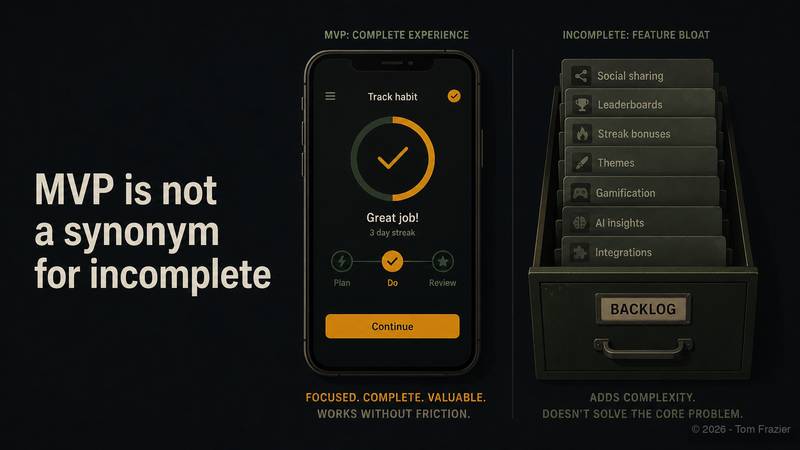
That's not an MVP. That's an incomplete product. The distinction matters.
An MVP is the smallest version of your app that delivers a complete, valuable experience for a defined user in a defined scenario. It may do very few things. The things it does should work without friction.
An incomplete product is a full-featured app that doesn't work. Founders build these because they add features to manage their own anxiety instead of removing them to sharpen the product.
The exercise is brutal and necessary: write down every feature in your app. Next to each one, write the specific user problem it solves and the evidence that users need it solved. Any feature that can't clear that test doesn't belong in v1.0. It belongs in a backlog — which means it belongs nowhere until users prove they need it.
Beta testing is not optional. It is the last line of defense between an incomplete product and a public embarrassment. Your beta cohort should be a sample of your actual target users, not your friends. Run it long enough to surface real failure modes, not long enough to feel comfortable. Comfort in beta is a warning sign.
Platform Choice Is a Strategic Decision
Founders treat platform choice as a technical question. It's a market question.
iOS and Android are different markets with different user behaviors, different monetization patterns, and different distribution dynamics. The right choice depends on who your user is, where they are, and what they're willing to pay.
A few structural realities:
iOS users, on aggregate, spend more on apps than Android users. If your business model requires in-app purchases or subscriptions, that tilts toward iOS. It also concentrates your exposure to Apple's review process, pricing policies, and platform decisions — each of which can affect your business without notice.
Android gives you more geographic reach and more flexibility in how you distribute and monetize — but more fragmentation in device and OS versions to support, and a user base with different average spending behavior. In Southeast Asia, Latin America, and parts of Africa, Android dominates. If those are your markets, ignoring Android is ignoring your market.
Building for both platforms simultaneously doubles your surface area, your QA burden, and your compliance overhead before you've validated that the product works at all. Most early-stage app founders should pick one, get it right, and expand — not ship both in parallel and do both poorly.
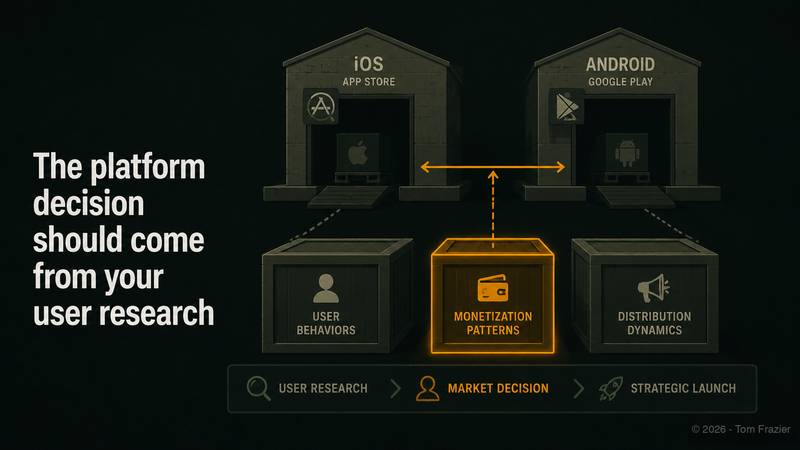
The platform decision should come from your user research, not your development team's preferences.
The Checklist That Doesn't Get Built Until It's Too Late
Most app launch failures aren't dramatic. They're a series of small omissions that stack into a failed launch. A confusing onboarding sequence. Missing screenshots. No press kit. An empty screen that shows up in edge cases and never gets fixed. A paywall with no persuasive copy.
None of these are catastrophic individually. Together, they produce an app that leaks users at every stage of the funnel.
The checklist below is divided into four categories. Go through each one before you submit. Not as a formality but as a test your true likelihood of successfully launching your app.
Market Readiness
Your launch is not an event. It's a sequence, and it starts before you submit to the app store.
- Post on your personal social channels — LinkedIn, Instagram, X — before the app goes live. Seed awareness before you need it.
- Make sure all App Store screenshots and descriptions are current and accurate. Screenshots are the first sales tool a user encounters. Treat them like marketing assets, not afterthoughts.
Post on relevant Reddit communities — r/apps, r/iOSApps, r/macApps, and any vertical-specific subreddits that cover your user's problem. Genuine participation, not spam.
- Create memes or short-form content for X. For apps targeting consumer users, this consistently outperforms press releases at the launch stage.
- Submit for an App Store Feature placement. It's a long shot, but the submission costs nothing and it forces you to articulate your app's value clearly.
- Build or update your press kit. This belongs in your website before launch, not after. Journalists don't wait. (See the other Operator's Edge article about building this)
- Reach out to press outlets relevant to your app's category. Identify three to five writers who cover your vertical and send a personalized pitch, not a bulk email.
- Submit to IndieAppCatalog and comparable directories. These audiences are small but engaged and actively looking for new apps.
App Review
App store rejections during launch are expensive in time and momentum. Most are preventable.
- Write a clear, specific description of your app's features or changes in the submission notes. Reviewers are not mind readers.
- Record video walkthroughs of any feature that requires more than two steps to use. Ambiguity gets rejected. Try dedicated tools like Supademo (no affiliation or paid link... I just like their product)
- Verify that your contact information in the developer portal is accurate. A bounced reviewer email will delay your approval.
- If your app has in-app purchases, document exactly where they can be found in the UI and what they unlock. Vague IAP descriptions are a common rejection trigger.
- Provide a working test account. Apple and Google reviewers need to be able to access your app's full functionality. If they can't test it, it doesn't get approved.
Accessibility
This section gets skipped most often. It shouldn't both on ethical grounds and practical ones. Accessible apps perform better in app store searches, receive better ratings from users who rely on accessibility features, and avoid a growing body of legal exposure in markets with digital accessibility requirements.
- Ensure all screens are readable by screen readers. VoiceOver on iOS and TalkBack on Android. Test it yourself — spend twenty minutes navigating your app without looking at the screen.
- Verify WCAG-compliant contrast ratios in both light and dark mode. Tools exist to check this automatically. Use them.
- Confirm that all screens support both left-to-right and right-to-left language layouts. If you plan to distribute in Arabic, Hebrew, or Farsi markets, this is not optional.
Common Error Avoidance
These are the failure modes that show up after launch, when it's already too late to fix them without damaging your early ratings.
- Add a Restore Purchases button. This is a non-negotiable requirement on iOS. Failing to include it is a rejection risk and a user trust issue.
- Implement a rating prompt after meaningful positive interaction. Not immediately after launch. Not on first open. After a user has done something that indicates they've gotten value. A well-timed rating prompt dramatically outperforms a poorly timed one.
- Fill every empty state. Empty screens — states where the app has no data to display yet — kill user retention. They look like bugs. Design them intentionally.
- Build an onboarding sequence. Your app's core value should be demonstrated, not explained. Onboarding should show, not tell.
- Design your paywall intentionally. The call-to-action should be prominent and specific. "Start Free Trial" outperforms "Subscribe." A/B test it. The paywall is not a compliance requirement — it's your primary conversion mechanism.
- Run beta testing with real target users before you submit. Not colleagues. Not family. Users.
- Build a support section with an FAQ. This reduces support burden and improves user ratings. Users who find answers themselves leave better reviews than users who hit a wall and leave.
- Create a landing page for the app on your website before launch. The app store page is not your only discovery channel. A dedicated landing page with screenshots, a value proposition, and an email capture gives you distribution options that don't depend on Apple or Google.
- Submit to Product Hunt on launch day. The ProductHunt community is self-selecting for early adopters, and the visibility spike from a strong Product Hunt launch is real.
- Have all legal documents in place before you submit: Privacy Policy, Terms of Use, End User License Agreement, Cookie Policy. If your app allows user-generated content, a UGC Policy is required. App stores check for privacy policies as a submission requirement. Courts don't care that you planned to add the EULA later.
The Only Question That Actually Matters
Every item on every checklist above is downstream of one decision:
Have you honestly established that a real market exists for this specific app, at this specific time, in the platform you've chosen?
The app stores will take your app. That process is relatively straightforward. What they won't do is send you users. They won't validate your market, fix your onboarding, or compensate for a positioning mistake.
The founders who launch successfully aren't the ones who built faster. They're the ones who answered harder questions earlier — and used the answers to build the right thing instead of a better version of the wrong thing.
This is the third article in Phase 2 — Startup & Launch. You can move ahead to preparing for press or access the AI tool below.
Engineer Your App Success. A free AI tool just for subscribers. ⤵️
This article is why I built the App Success GPT. It is designed to analyze your app's specific details, creating tailored checklists, reviewing key aspects for success, and evaluating your app's market viability.
Get comprehensive market analysis and strategic planning, ensuring your app is positioned effectively in a competitive landscape.
Common Questions About App Success
How can it help if I'm unsure about the market potential of my app?
App Success provides detailed market research and analysis, identifying target audiences and market trends, to validate and enhance the market potential of your app.
I'm concerned about the complexity of app launch. Can it help simplify it?
App Success offers streamlined, step-by-step guidance for app launches, breaking down complex processes into manageable tasks, ensuring a smooth and successful launch.
What if I'm not familiar with app marketing strategies?
App Success brings expertise in contemporary app marketing strategies, offering personalized advice and proven techniques tailored to your app's unique needs.
How do you address the technical aspects I might not understand?
App Success translates technical jargon into clear, understandable language, ensuring you're fully informed about the technicalities of your app development.
Can you help in optimizing my app for better user engagement?
App Success provides in-depth guidance on enhancing user experience and engagement, from intuitive design to compelling content and features.
This post is for subscribers only
Sign up now to get access to the post.
Already a member? Sign in

